
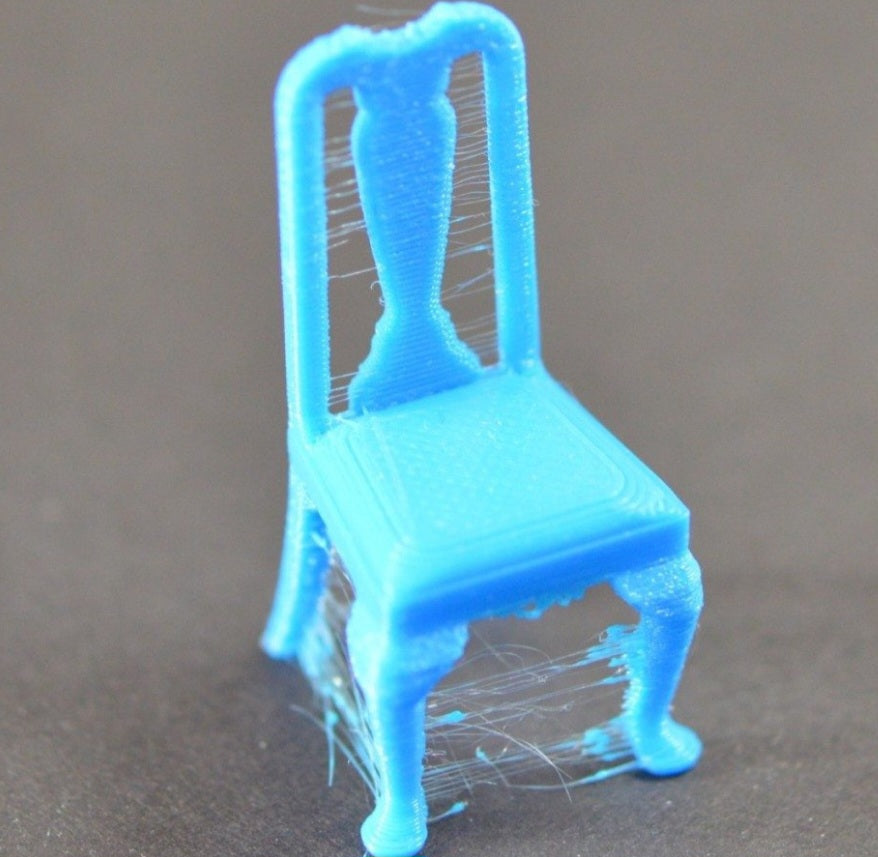
Taming the Webs: Why Your 3D Prints Are Stringing (and How to Stop It)
We’ve all been there: you’ve spent hours setting up the perfect print, only to find your model covered in fine, hair-like strands of plastic. It looks a bit like your 3D printer has been visited by a clumsy spider! Stringing is incredibly common, but don't let it discourage you—it’s usually just a sign that your printer’s settings need a quick tune-up.
What Actually Causes Stringing?
In simple terms, stringing happens when molten plastic oozes out of the nozzle while the printer is moving between two points. Instead of "retracting" the filament (pulling it back) cleanly, the plastic keeps trailing along. Think of it like a glue gun that keeps dripping even after you’ve stopped pressing the trigger.
The Big Three Fixes
You can usually clear up those webs by adjusting three main settings in your slicer software:
Retraction Distance: This is the most important setting. It tells your printer how much filament to pull back when it makes a non-printing move. If it’s too low, not enough plastic is pulled back, causing that ooze. Try increasing it in small increments—like 0.5mm at a time—until the stringing stops.
Retraction Speed: This controls how fast the printer pulls the filament back. If it’s too slow, the plastic has time to ooze out before the retract is finished. You want this to be snappy and and efficient.
Printing Temperature: Sometimes, your hotend is just running a bit too hot for the specific filament you’re using, making it too runny. Try lowering your printing temperature by 5°C to 10°C to see if it thickens the flow and reduces the ooze.
A Few More Pro-Tips
Beyond your slicer settings, consider these practical checks:
Check Your Filament: Believe it or not, damp filament is a major culprit for stringing. If your material has absorbed moisture from the air, it can behave unpredictably. Keeping your filament in a dry box or using a dryer can make a massive difference.
Travel Speed: Increasing the speed at which your print head moves between non-printing points can also help, as it leaves less time for the plastic to ooze out.
Remember that every printer and filament combination is slightly unique, so don't be discouraged if it takes a few test prints to dial everything in perfectly. You might want to print a simple "retraction tower" calibration model to see how different settings affect the stringing in real-time. By systematically testing these changes, you will soon get back to producing clean, high-quality prints that you can be proud of!


