
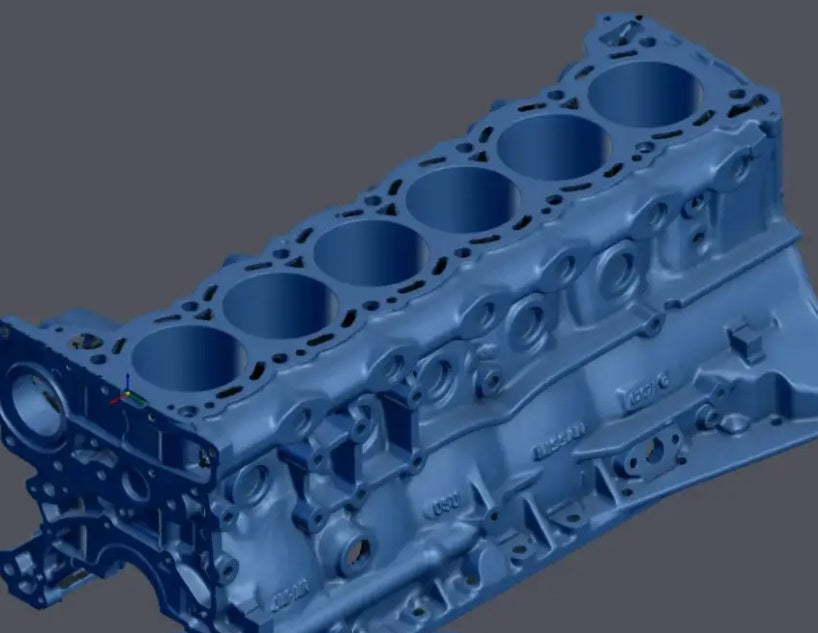
Can You 3D Scan an Engine? The Reality of Automotive Reverse Engineering
Yes, you can 3D scan an engine, but it is a sophisticated process that requires moving beyond basic hobbyist tools. While 3D scanning is a powerful way to digitize complex components for engineering, restoration, or custom modification, scanning an engine involves specific technical hurdles that you need to be prepared for.
The Challenges of Engine Scanning
Scanning an engine is far more complex than scanning a car's exterior due to the intricate geometry and high-precision requirements.
Deep Recesses and Line-of-Sight: Engines are full of complex castings, deep holes, and narrow passages that are often physically impossible for a scanner to "see" into directly.
Surface Complexity: Engines are often made of aluminum or steel with varying textures and levels of cleanliness (grease, grime, or oil), which can interfere with the scanner's light projection.
Tight Tolerances: If you are trying to reproduce internal engine parts, remember that "near-perfect" is often not enough. Components with extremely small tolerances—like those inside cylinders—cannot be replicated by a rough scan alone; they require precise engineering and mechanical knowledge.
Tips for a Successful Engine Scan
If you’re ready to bring an engine into your digital workspace, preparation and the right approach are critical.
Cleanliness is Mandatory: Before you begin, thoroughly clean the part to remove all oil, grease, and debris. Contaminants on the surface will degrade the accuracy of your point cloud.
Use Strategic Markers and Sprays: Just like with full-body car scans, reflective or dark metallic surfaces may require a temporary matte scanning spray to capture data effectively. Using markers (like miniature pyramids) can also help the scanner maintain orientation across complex surfaces without needing constant realignment.
Scan as a Reference, Not a Final Part: Use your 3D scan as a digital "blueprint" or reference model. Don't try to use the raw mesh as the finished part. Instead, import the mesh into CAD software (like Fusion 360 or Geomagic) to build a fully editable, parametric model that accounts for the correct mechanical tolerances.
The "Scan-to-CAD" Workflow
It is important to understand that a raw 3D scan is merely a "digital ghost" of the engine. In a professional reverse engineering workflow, you capture the point cloud, refine the mesh to remove noise, and then use that data to build an accurate CAD model. This process allows you to modify geometry, extract cross-sections for mounting brackets, or document legacy parts that no longer have original drawings.
The Benefit of Digital Records
Beyond building new parts, 3D scanning is a great way to record exactly how an engine looks before you take it apart. It creates a perfect digital map of the engine's original layout, including where all the hoses and accessories were connected.
This serves as a reliable guide that makes putting everything back together much easier, and it helps you spot any space or clearance problems before they become an issue during your build.


