
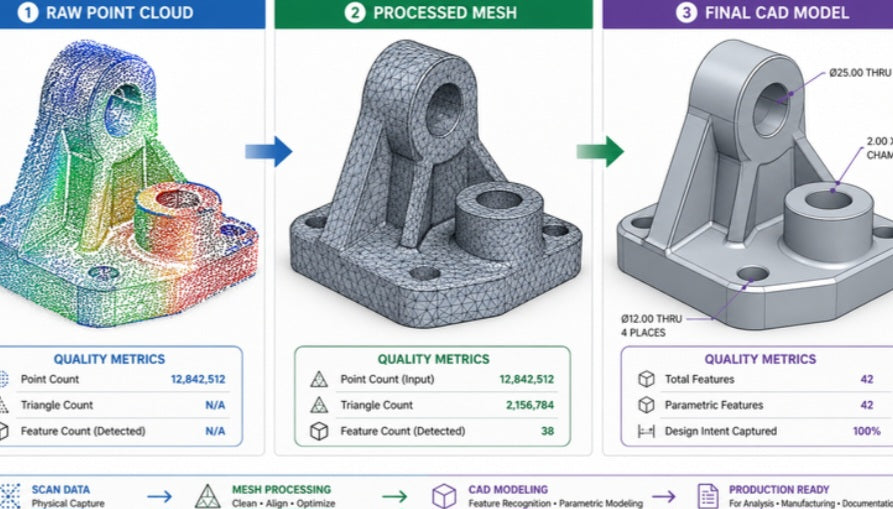
Converting an STL file to a CAD model is the most critical step in taking a 3D scan or a downloaded 3D print file and making it ready for professional engineering.
An STL file is essentially a "digital shell" composed of thousands of flat triangles, which lacks the mathematical precision needed for tasks like CNC machining or design changes. Because of this, you cannot simply "open" an STL in CAD software and expect to edit it easily. Instead, you must use a process called reconstruction.
The most common way to handle this is through a process known as auto-surfacing or manual reverse engineering.
In specialized software, you import the STL and use it as a visual reference to "trace" over the geometry. By creating new sketches and solid features—such as extrusions, revolves, and holes—based on the underlying mesh, you build a "parametric" CAD file from scratch.
This new file contains the engineering intent of the part, allowing you to adjust dimensions, apply tolerances, and perform stress analysis, which were impossible with the original STL.
For simpler parts or when you are pressed for time, some advanced software packages offer automated conversion tools that can quickly turn a mesh into a solid body.
While these automated methods are faster, they often result in "dirty" models with thousands of complex surfaces that are difficult to edit later.
For high-performance automotive or industrial applications, professional designers typically prefer the manual approach, as it ensures the final CAD model is clean, accurate, and optimized for high-end manufacturing processes.
By evolving your workflow to prioritize clean, native CAD geometry over raw imported data, you shift your focus from merely troubleshooting part files to actively improving hardware performance. This approach streamlines your production cycle and removes the common frustrations of working with rigid, uneditable geometry.
Ultimately, this provides a scalable and professional foundation for every custom engineering challenge you encounter. By securing your files in a format that is built for growth, you ensure your designs remain adaptable to any future technical requirements.


