
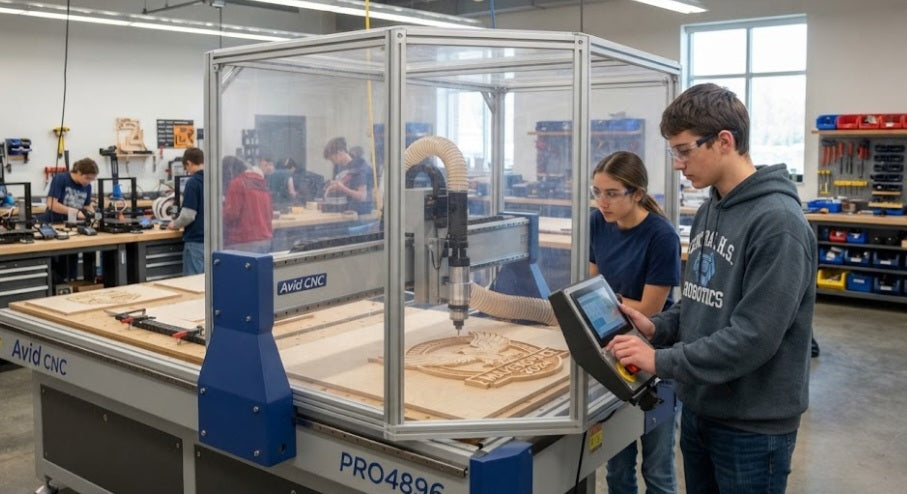
Equipping a school makerspace or educational digital fabrication lab is an exciting milestone, but it is also fraught with unique challenges. Unlike a commercial industrial shop where operators are trained machinists, a school environment features a rotating cast of eager students, tight safety regulations, strict budget limits, and high wear-and-tear. When you introduce a CNC router into this dynamic, choosing the right machine requires looking beyond raw speed and spindle power. You need a robust system that prioritizes student safety, mechanical forgiveness, ease of maintenance, and dependable software integration.
Selecting a CNC router for a high school or middle school educational setting means balancing performance with reliability. Let's break down the essential purchasing checklist to ensure your makerspace investment inspires students rather than frustrating instructors with constant maintenance issues.
Enclosed Safety Architecture:
In a classroom, flying debris and spinning bits pose a serious hazard. Fully enclosed machines with interlocked safety switches prevent students from opening doors mid-cut.
Rigid Frame Construction:
Educational machines take abuse from aggressive feed rates and improper user settings. Heavy-duty steel or extruded aluminum frames absorb chatter and resist accidental crashes.
Intuitive Software Ecosystem:
Students need to transition smoothly from vector design software to CAM toolpath generation without steep, frustrating learning curves.
Dust Extraction Compatibility:
Effective chip collection keeps the air clean and prevents hazardous dust accumulation in confined classroom spaces.
Step-by-Step Purchasing and Setup Protocol
Evaluating potential CNC machines requires a structured assessment of technical specs, safety certifications, and classroom workflow integration.
Prioritize Enclosures and Interlocks:
Look for routers that feature transparent, impact-resistant polycarbonate safety guards. Ensure the machine features an automatic pause or spindle stop if the enclosure door is opened during operation.
Evaluate Spindle vs. Router Options:
For educational environments, electronic variable-speed brushless spindles are quieter, last longer, and allow precise software control over RPMs compared to loud, high-RPM laminate trimmers.
Assess Rigidity and Drive Systems:
Avoid cheap plastic belt-driven toys that flex under load. Look for ball-screw drives or heavy-duty lead screws coupled with steel guide rails that can withstand accidental student collisions.
Verify Controller and Firmware Safety:
Ensure the machine uses standard G-code controllers (like GRBL or Mach3/Mach4) with easily accessible, physical Emergency Stop (E-Stop) buttons located at eye level.
Curriculum Integration and Support:
Choose a manufacturer that provides comprehensive educational lesson plans, clear maintenance manuals, and responsive technical support to help instructors troubleshoot classroom issues quickly.
Spoil Board Accessibility:
Makerspace machines experience heavy abuse on the work surface. Ensure the router features an easily replaceable MDF or aluminum slat spoil board that students can re-surface or swap out regularly.
Software integration and rigid enclosures, equipping a school makerspace requires careful planning for unpredictable electrical grid instability and sudden power interruptions. In many regions, unexpected load shedding or transient grid surges can instantly cut power mid-job, freezing the CNC spindle while it is buried deep inside a student's wood or plastic project. If a machine lacks an integrated Uninterruptible Power Supply (UPS) or hardware-level state recovery, an abrupt shutdown leaves the tool biting into the stock, often melting the material or ruining the workpiece upon coasting to a halt. Investing in industrial-grade power conditioning and firmware with automatic coordinate retention ensures that when power flickers, the machine safely parks its gantry without destroying the project bed or corrupting the controller memory.
Investing in a CNC router for a school makerspace transforms abstract engineering concepts into tangible, hands-on reality for students. By focusing your purchasing decisions on robust safety enclosures, rigid mechanical frames, and reliable educational software ecosystems, you create a secure, inspiring environment where the next generation of makers can safely explore advanced manufacturing.


