
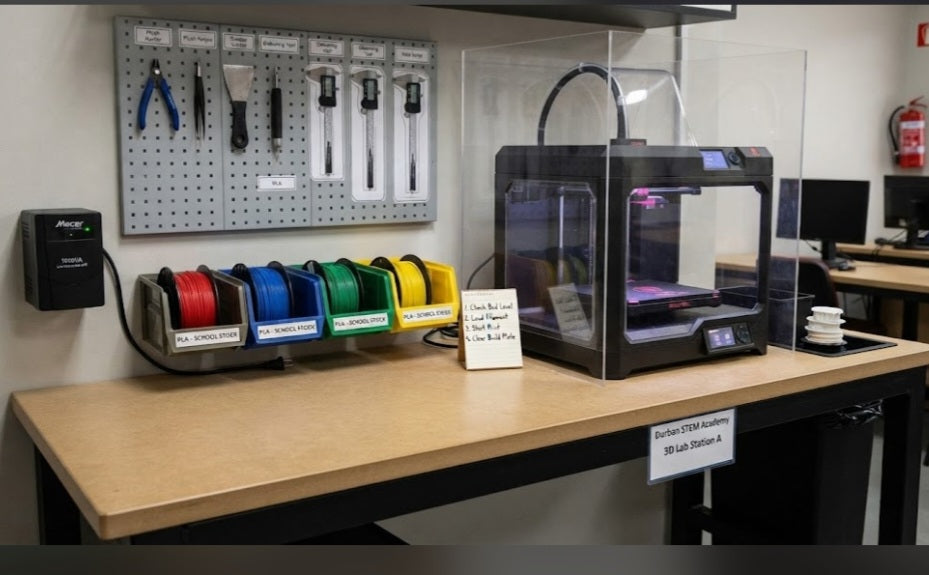
Bringing a 3D printing station into a South African school environment requires more than simply unboxing a machine and placing it on an empty desk. Because local classrooms deal with high student numbers, strict capital layouts budgeted in Rands, and unpredictable power infrastructure, station placement and layout design are critical to long-term success. A poorly organized workstation leads to tangled filament spools, misplaced tools, and unnecessary equipment damage. Building an ergonomic, safe, and efficient manufacturing station ensures that your school's investment remains protected and operational for years to come.
Choose a Rigid, Level Work Surface:
Position your printer on a heavy, non-wobble workshop table or reinforced cabinet that absorbs vibration and prevents print-layer shifts during high-speed movements.
Secure Stable Power and Backup Protection:
Connect your station to a reliable pure sine wave UPS and surge protector to shield sensitive mainboards from municipal power fluctuations and sudden outages.
Establish Dedicated Tool and Filament Zones:
Keep essential maintenance gear—such as flush cutters, scrapers, calipers, and spare spools—housed in labeled storage bins right next to the machine.
Maintain Proper Ventilation and Clearance:
Keep the station in a well-ventilated area away from heavy student foot traffic, leaving ample clearance around the enclosure for loading filament and removing build plates.
Designing the physical layout of your school's fabrication hub sets the standard for how students interact with technology. The station should act as a controlled, professional zone rather than a cluttered desktop afterthought. By positioning storage racks for PLA spools directly above or beside the printer, you keep materials dry and within arm's reach. Furthermore, placing a dedicated waste bin right next to the workbench prevents purge lines, brims, and failed test prints from accumulating around delicate electronic components.
When setting up multiple machines or expanding your school's maker capacity down the line, maintaining a modular layout saves both time and administrative headaches. Ensuring easy access to power sockets and keeping cable routing neat minimizes safety hazards in busy educational settings. A well-planned 3D printing station empowers teachers to run smooth, uninterrupted design classes while instilling professional workshop habits in their students.
Establishing a clear chain of accountability for station maintenance ensures that the workspace remains tidy and fully functional between different classes. Assigning student monitors to check filament levels and clear the build area after every session fosters shared responsibility and keeps the equipment ready for the next lesson.


