
Achieving a crisp, uniform laser engraving is the goal for every maker, but there is nothing more frustrating than pulling a project off the honeycomb bed only to find the burn is faint, patchy, or completely missing in spots.
Whether you are running a diode, CO2, or fiber laser, inconsistent engraving results usually boil down to a few common culprits.
Material Surface Irregularities and Warp
The Problem:
Natural materials like wood, leather, and cork are rarely 100% flat or uniform. If your board has a slight warp, bow, or uneven thickness, parts of it will drift out of the laser's focal point. Even a millimeter of distance change drastically widens the laser beam, reducing its power density and resulting in a lighter or blurry burn. Furthermore, natural wood grain density varies; hard growth rings resist the laser, while softer areas burn deeper.
The Fix:
Always use weighted hold-down pins, magnetic pins, or a honeycomb bed clamp to keep your stock completely flat. If you are working with thick or warped lumber, surface plane your material first, or manually refocus your laser on the highest point of the board.
Incorrect Focal Distance
The Problem:
The laser beam must be tightly focused to deliver maximum energy to the material surface. If your focal height is even slightly off due to incorrect gauge measurements or slipping motorized Z-axes, the laser spot size expands, spreading the energy out and creating weak, washed-out engravings.
The Fix:
Double-check your focus using your machine's physical focus gauge, a ramp test, or an automated focus probe. Ensure there is no debris accumulated on the lens tip or focus sensor that could throw off the measurement.
Dirty Optics (Lens and Mirrors)
The Problem:
Smoke, resin vapor, and fine dust are inevitable byproducts of laser cutting and engraving. Over time, a microscopic film of residue settles on your laser’s focusing lens and mirrors. This grime absorbs the laser beam's energy before it even reaches your material, severely weakening output power.
The Fix:
Inspect your laser head optics regularly. Clean your lens and mirrors gently using optical-grade isopropyl alcohol (99%) and lint-free lens wipes. If a job produces heavy smoke (like MDF or leather), you may need to clean your optics more frequently.
Software Settings: Resolution, Power, and Speed
The Problem:
Inappropriate settings in your laser software (like LightBurn or LaserGRBL) can easily ruin an engraving. If your line interval (DPI/Lines per Inch) is set too high for the material, the lines overlap incorrectly. Conversely, if your power is too low or your speed is too high, the laser simply flashes over the surface without enough dwell time to vaporize or char the material.
The Fix:
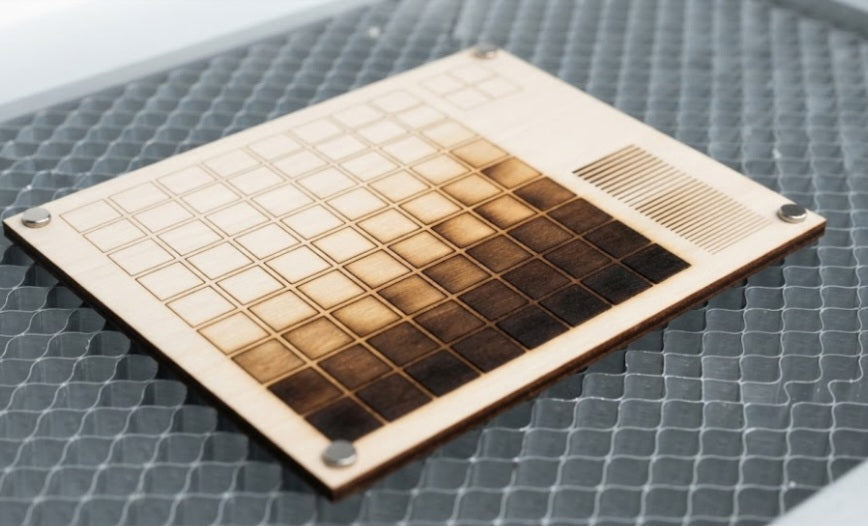
Run a material test grid whenever you switch to a new batch of wood, acrylic, or leather. Adjust your power upward or slow down your engraving speed incrementally. For detailed photo engravings, ensure your image contrast is boosted and your dithering mode (such as Jarvis or Newsprint) matches the characteristics of your substrate.
Belt Tension and Mechanical Slippage
The Problem:
If your engravings look "streaky" with alternating light and dark bands, or if lines appear doubled and ghosted, the issue is usually mechanical. Loose timing belts, slipping stepper motor pulleys, or a loose laser head can cause the gantry to stutter or skip steps during high-speed raster engraving.
The Fix:
Power off your machine and check the tension on your X and Y axis belts—they should feel like a plucked guitar string, neither sagging nor overtightened. Check that your grub screws on the motor pulleys are tightly secured to the shafts.
Final Thoughts
Troubleshooting a bad engraving is a process of elimination. Always start with the simplest maintenance checks—cleaning your lens and ensuring your material is completely flat—before adjusting complex software parameters.
Keeping a physical material log or test card library next to your machine will save you time, material, and frustration on every future project!


